Google Ads for Multi-Location Franchises: How to Structure It
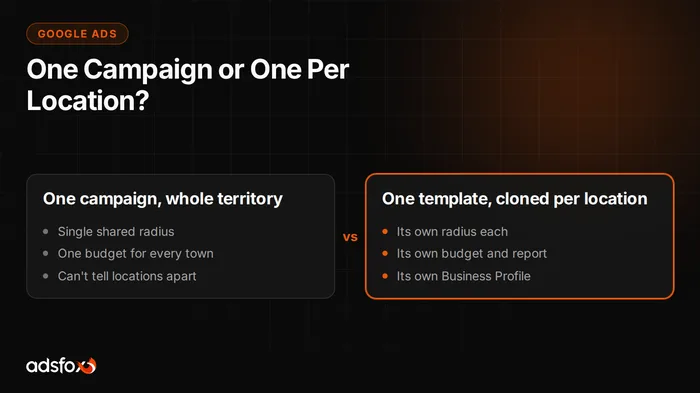
The right way to run Google Ads across a franchise with many locations is to build one campaign template and clone it for every location, each with its own geo-targeting radius, its own budget, and its own Google Business Profile location extension tied to that address. A single campaign built to cover an entire territory looks simpler to set up, but it blends every location’s clicks, cost, and leads into one number that tells corporate nothing about which town is actually working.
Why doesn’t one campaign for the whole territory work?
A campaign targeting an entire state, metro area, or list of zip codes has no way to report on a single location. Google’s bidding system also does not distribute spend evenly across a wide area: it chases the combination of keywords and geography that looks cheapest to it, which is rarely the mix that matches where your locations actually sit. A location in a market with less competition might get almost no impressions while a location in a crowded market eats the whole budget, and nobody would know it from looking at the account.
There’s also no way to route a lead back to the right storefront when the targeting itself doesn’t know which location is closest to the person who clicked. A franchise that runs this way usually finds out a location is underperforming only when the franchisee calls to ask where the customers are.
What does a cloned campaign template include?
A location campaign built from a shared template usually carries over the same keyword list, the same ad copy structure, and the same brand rules corporate has approved, with a small set of fields swapped per location:
- The geo-targeting radius, drawn around that address
- The daily or monthly budget for that specific campaign
- The Business Profile location extension for that address
- Local details in the ad copy, such as the city name or a location-specific offer
- A call extension or lead form tied to that location
Because the structure is fixed, adding a new location to the network means filling in these fields rather than building a campaign from scratch. This is the same mechanism our franchise marketing agency uses for networks running dozens or hundreds of locations at once: one approved template, applied consistently, instead of a new setup decision every time.
How does a Business Profile location extension fit in?
The location extension attaches a specific Google Business Profile to an ad, so a person searching nearby sees the map pin, hours, and phone number for the location the campaign is actually targeting, not a generic brand listing. For a franchise, this only works if every location has its own claimed and accurate Business Profile in the first place. A campaign pointed at a location whose Business Profile has the wrong hours or an old phone number will send confused customers to a location that can’t help them. Keeping that data current across a network is its own project; we cover it in Google Business Profile management for franchise locations.
Should a franchise use one shared Google Ads account or one per location?
There isn’t a single right answer here, and it usually comes down to who pays for the media and who needs to see the results.
One shared account (with campaigns organized by location) makes sense when:
- Corporate pays for media from a marketing or advertising fund
- The network wants one person or team approving changes across every location
- Franchisees don’t need direct login access to see or adjust their own spend
Separate accounts per location make sense when:
- Each franchisee pays their own media bill on their own card
- A franchisee wants to log in and see their own numbers without a request to corporate
- The network wants a clean audit trail of exactly what one location spent
A middle option many networks land on is a manager account (Google calls it an MCC) with a separate sub-account per location underneath it. Corporate keeps a view across the whole network and can push template changes down, while each location’s spend and results stay in its own account. This tends to be the more durable setup once a network passes a dozen or so locations, because it avoids a single account where one location’s spending decision quietly affects another’s numbers.
How do you avoid locations competing against each other?
When two locations sit close together, overlapping targeting radiuses put both campaigns into the same auction for the same searchers. That drives up the cost per click for both locations without adding a single new customer, since the ad system doesn’t know they belong to the same network. The fix is to draw radiuses that split territory instead of duplicating it, typically along a line roughly equidistant between the two addresses, and to adjust that line if one location’s population density is clearly higher than the other’s.
How do you track which location a lead actually came from?
Every lead needs a location tag from the moment it comes in, not after the fact. That means a location-specific phone number or call extension, a location-specific lead form, or a hidden field on a shared form that records which campaign sent the click. From there, sales status should flow back to Google so the campaign learns from which leads actually became customers, not just from raw form fills. Server-side tracking and CRM-level conversion tracking (Google calls the API version Enhanced Conversions) are what make that feedback loop possible instead of guesswork. This is the same measurement layer covered in our franchise advertising fund guide, because a franchisee generally won’t trust a shared fund’s spending without seeing their own location’s cost per lead.
Corporate-run vs. franchisee-run campaigns
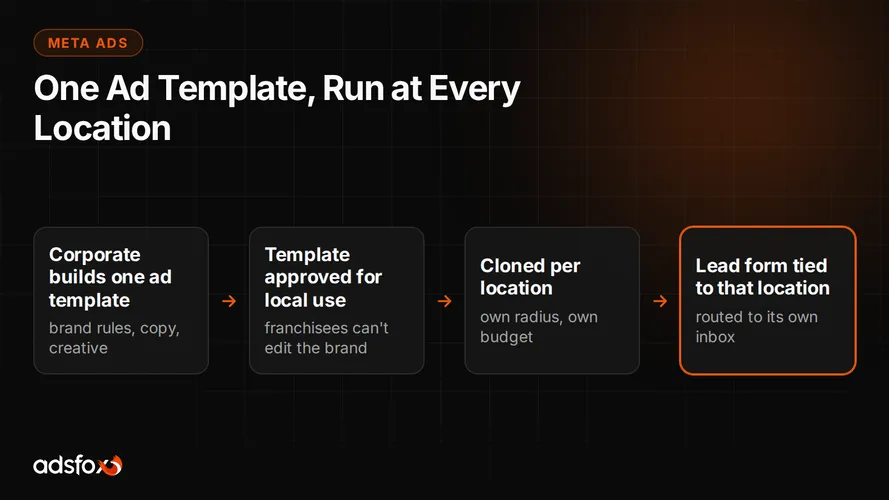
Most networks land on one of three setups. Corporate can fund and run every location’s campaign from a central fund, in which case a franchisee sees a report but doesn’t touch the account. A franchisee can run their own campaign inside a template corporate provides, paying their own bill and controlling their own budget. Or the two can share the cost, with corporate covering the template and part of the spend, and the franchisee topping up their own local budget. None of these is universally correct: it depends on the franchise agreement, how much a franchisee wants direct control, and how much central oversight the brand needs. The same three-way split shows up in Meta Ads for franchises, where the same trade-off between corporate control and local ownership applies to a different ad platform.
Getting the setup right the first time
The most common mistake we see in a multi-location Google Ads account isn’t the keyword list, it’s the structure: one campaign trying to do the job of twenty, or twenty campaigns built by hand with no shared template, so every location drifts from the brand’s approved copy over time. Getting the template right once, before the network scales past a handful of locations, saves a rebuild later. For the full picture of how campaigns fit into a network’s broader marketing plan, see our franchise marketing hub, or talk to us directly about setting up your account structure.