AI Traffic in Google Analytics: How to Find and Measure It
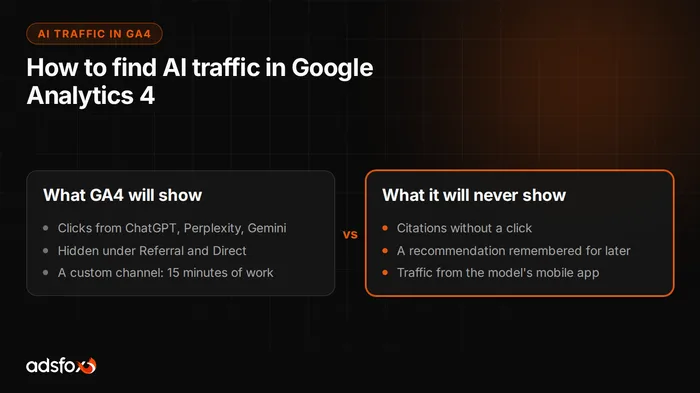
Traffic from ChatGPT, Perplexity, or Gemini has no place of its own in GA4. By default it lands in the Referral channel, and some of it in Direct, so on standard reports you simply cannot see it. You have to carve it out yourself.
Below are two ways: a quick one that takes five minutes and a permanent one that takes fifteen. Plus something most guides stay silent about, which is why those numbers will be undercounted anyway.
The quick way: an exploration with a filter
If you only want to check whether anything is coming in at all, do not build anything permanent.
Go to Explore, create a blank exploration, add the dimension Session source and the metric Sessions. Then apply a filter: session source matches regex, and paste this as the value:
chatgpt\.com|chat\.openai\.com|perplexity\.ai|gemini\.google\.com|copilot\.microsoft\.com|claude\.aiIn ten seconds you will see whether you have this traffic and from which tools. The downside is that explorations are private and have to be recreated, so they are not suitable for ongoing reporting.
The permanent way: a custom channel
Admin, then Data display, then Channel groups. Copy the default group or create a new one, and add a channel in it:
- Name:
AI - Condition: Session source matches regex
- Value: the same regex as above
And now the most important part.
The trap that usually makes it not work
Move the AI channel above Referral. GA4 processes rules top to bottom and assigns a session to the first one that matches. If Referral sits higher, it will capture all traffic from the models before it reaches your rule, and you will see zero.
This is the most common reason people set up an AI channel, look at the report the next day, and conclude that nothing is coming from it.
The second thing to remember: a new channel group also applies retroactively to historical data in standard reports, but it does not change the attribution of conversions already reported. So do not count on old reports recalculating session by session.
Which sources to include
The list grows every month, so treat it as a starting point, not a complete set:
chatgpt\.com|chat\.openai\.com|openai\.com|perplexity\.ai|gemini\.google\.com|
bard\.google\.com|copilot\.microsoft\.com|claude\.ai|you\.com|deepseek\.com|
grok\.com|meta\.ai|search\.brave\.com
Two practical notes. Copilot can show up both as copilot.microsoft.com and as regular traffic from bing.com, so part of that traffic cannot be separated. ChatGPT appends the parameter utm_source=chatgpt.com to some links, which can be a more reliable trace than the source alone, because it survives even when the browser does not pass the referring page.
The proportions to expect: according to industry analyses, ChatGPT currently accounts for about 87% of traffic from AI tools, Perplexity for about 4%, Claude and Copilot for about 2% each, and the rest is a long tail in which Gemini is growing fastest (Swydo). If ChatGPT does not dominate in your data, check whether the regex is missing variants.
Why these numbers are undercounted
This is the part worth knowing before you start drawing conclusions.
The ChatGPT mobile app and the in-app browsers of AI tools often do not pass referrer information. Such a visit lands in Direct and cannot be distinguished from someone who typed the address from memory. The same applies to some users of free versions.
The practical consequence: the GA4 number is a floor, not a measurement. Real AI traffic is higher, you just do not know by how much.
What to do about it, given that it cannot be fixed:
- Watch the trend, not the absolute value. If the AI channel grows month over month, the invisible part grows too.
- Look at Direct. A sudden rise in Direct with no campaign and no growth in branded traffic is often the shadow of AI traffic.
- Check landing pages. If Direct suddenly shows entries to a specific guide rather than the homepage, that is not traffic from memory.
A separate trap: Google AI Overviews
No regex will catch this, and it is worth understanding, because it probably concerns the largest share of your AI traffic.
When Google shows an AI Overview above the search results and the user clicks a link in the summary, that visit reaches GA4 as regular organic traffic from Google. There is nothing in it that distinguishes it from a click on a classic result. Search Console does not split those clicks into a separate dimension either.
So: your AI channel will show ChatGPT and Perplexity, but traffic from the AI layer of the world’s largest search engine will stay in organic and cannot be separated.
Indirect signals that AI Overviews are taking your traffic:
- Impressions in Search Console grow while clicks stall or drop. The classic symptom: you are visible, but the answer was given above the result.
- CTR drops at an unchanged position. If a query has an AI Overview and you are in the same position as six months ago but losing clicks, it is usually not the title’s fault.
- Check whether your key queries have an AI Overview at all. Just type them into Google and see what sits above the results.
What GA4 will never measure
The most important thing. GA4 shows clicks, and in AI answers a click is the exception, not the rule.
A user asks a model for a company for a specific job, gets three names with a short description, and remembers one. They click nowhere, because they do not need to. A week later they type that name into Google. In GA4 you will see branded search traffic and never learn that it started with a conversation with a model.
That is why AI visibility is measured on two tracks:
- Clicks in GA4, as described above. Easy, but it is the tip of the iceberg.
- Citations, meaning how often the model names the brand. They are measured by asking the models a fixed set of buying questions and counting in how many answers the brand appears and in what company.
The second part matters more for the business, and we describe it step by step in our article on what AI SEO is. If you suspect the problem starts earlier and the models cannot access your site at all, start with our article on how to check whether AI sees your website.
How to read this traffic once you can see it
Three things worth checking, in this order.
How much of it there is at all. For most service businesses today this will be single digits or a couple dozen sessions a month. That is normal and no reason to give up, because the channel is growing.
What people land on. Landing pages from AI traffic show which content the model considered worth passing along. That is free information about what on your site is citable, and the best hint about what to write next.
Whether the traffic does anything. Engagement and conversions, but with caution. With a dozen sessions a month, the conversion difference between channels is statistical noise, not a conclusion. Wait for hundreds of sessions before you start comparing.
What to set up in the first week
A list you can get through in one afternoon.
- Build the AI channel in channel groups and move it above Referral. Fifteen minutes.
- Add the UTM parameter to the regex, not just the domains, to catch traffic where the browser did not pass the source.
- Record the baseline: sessions from the AI channel, Direct’s share of total traffic, and Search Console CTR on five key queries. Without it you will have nothing to compare against in three months.
- Check landing pages from the AI channel. That is the cheapest information about which content is citable.
- Run a first citation measurement, because that is what shows the channel in full, not just its tip.
- Set a reminder for a month from now. A one-time reading says nothing, the trend says everything.
What not to do in the first week: do not compare the AI channel’s conversion rate with organic. At that number of sessions it is not data yet, just chance.
Summary
AI traffic has been in GA4 for a long time, just hidden under Referral and Direct. Carving it out takes fifteen minutes: a custom channel group, a regex on sources, and the AI channel moved above Referral, because without that it catches nothing.
Keep two limitations in mind. The numbers are undercounted, because some tools do not pass referrer information. And they are only the tip, because the most common effect of appearing in AI answers is a remembered brand, not a click.
If you want someone to set this up for you and show who is cited in your industry today, see how we work as an AI SEO agency or book a free consultation.