llms.txt: What It Is and How to Check If AI Sees Your Site
llms.txt is a plain text file in the root directory of a domain that gives AI models a summary of the site and a list of its most important pages. The idea is simple: instead of letting the model wander around the whole site, you hand it a ready table of contents.
Before you implement it, though, it is worth knowing the answer to a question most guides on the topic avoid.
Do AI models actually read llms.txt
As of today there is no evidence that they do, and there are signs that the opposite is true.
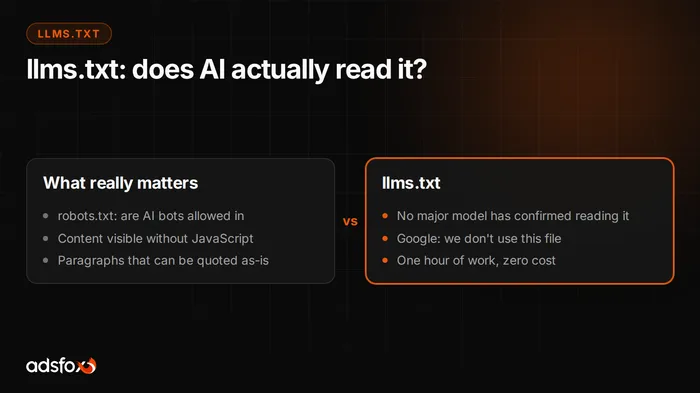
John Mueller of Google said plainly that no AI system uses this file and that you can see it in the server logs, because the crawlers do not even request llms.txt (Search Engine Roundtable). He compared it to the meta keywords tag, a solution that stopped meaning anything years ago.
On OpenAI’s side the picture is similar. The crawler documentation (GPTBot, OAI-SearchBot, ChatGPT-User) describes access control exclusively through robots.txt and does not mention llms.txt even once. None of the major companies, not OpenAI, not Google, not Anthropic, has publicly confirmed using the file in production.
The standard itself is a proposal published at llmstxt.org, not an industry agreement like robots.txt. There is no enforcement behind it and no declaration of adoption.
So why have it at all
For three reasons, none of them magic.
It costs an hour and nothing more. No maintenance, no risk, no way to hurt yourself with it.
It forces order. To write a good llms.txt, you have to describe each service in one sentence and decide which pages really matter. That exercise usually exposes a messy offer and, as a bonus, produces ready descriptions for other uses.
It is a cheap bet. If the standard catches on, you will be ready without rushing. If not, you have lost nothing but an hour.
What not to do: do not treat it as an action you will see a result from, and do not pay for it as if it were a service. If someone sells you llms.txt as the key to AI visibility, they are selling you hope.
What really decides whether AI sees your website
Three things, in order of importance.
1. Whether AI crawlers are allowed in
This is a binary condition and the most common cause of invisibility. AI bots are separate agents, different from Googlebot, and they are very often blocked, not by a conscious decision but by default settings of the hosting, the CDN, or a security plugin.
The agents in question:
- GPTBot, OAI-SearchBot, ChatGPT-User (OpenAI)
- PerplexityBot (Perplexity)
- ClaudeBot, Claude-Web, anthropic-ai (Anthropic)
- Google-Extended (Google, separate from Googlebot)
- Applebot-Extended (Apple)
- CCBot (Common Crawl, a training data source for many models)
If robots.txt says nothing about them, the general rule applies. If there is a block, you disappear from this channel entirely, regardless of content quality.
It is worth spelling this out instead of relying on default behavior:
User-agent: GPTBot
Allow: /

User-agent: PerplexityBot
Allow: /

User-agent: ClaudeBot
Allow: /
2. Whether the content exists without JavaScript
Some AI crawlers do not execute JavaScript, or do so selectively. If your site loads content only in the browser, a bot may see an empty frame. Server-rendered or statically generated pages do not have this problem.
Quick test: turn off JavaScript in your browser and open your service page. That is roughly what a simpler bot sees.
3. Whether the content can be quoted
Even with access and clean HTML, the model has to have something to lift. It picks fragments that answer the question in full, without editing. A paragraph that starts with a warm-up and hides the point in the third sentence loses to a paragraph that answers right away.
We cover this in more depth in our article on what generative engine optimization is.
How to check whether AI sees your website: four steps
Step 1: server logs
The most reliable source. Search the logs from the last thirty days for the agent names listed above. On a server with shell access, one command is enough:
grep -icE "GPTBot|OAI-SearchBot|ChatGPT-User|PerplexityBot|ClaudeBot|CCBot" access.logIf the result is zero, no AI bot has visited you in that period and that is your problem number one. On Cloudflare you will find the same data in the bot traffic analytics, without digging through logs.
Step 2: robots.txt
Open https://yourdomain.com/robots.txt and check whether any of the AI agents has a Disallow. Also check the rule for User-agent: *, because that is the one that applies to everyone not listed.
Step 3: a live test in a model
Go to ChatGPT or Perplexity and ask for a summary of a specific page, giving its URL. If the model answers in generalities or admits it cannot fetch the page, you have an access problem. If it summarizes the content correctly, the technical layer works.
This is not a citability test, only an accessibility test. It checks whether the model can read you when you hand it the address yourself.
Step 4: the citability test
Only now the real question: will the model name you on its own. Ask a buying question from your industry, without giving a URL, for example “which company in Texas does X,” and see who comes up in the answer.
Repeat it across several models, because results can differ wildly. And repeat it in a month, because a single reading tells you nothing.
How to write llms.txt
The format is simple and described at llmstxt.org: plain Markdown saved as llms.txt in the root directory.
A structure that works for a business website:
# Company name - what it does

> One or two sentences: who this is, who they work for, since when.

Why we are a credible source: experience, numbers, certifications.

## Services

- [Service name](https://domain.com/path/): one sentence on what it is and who it is for.

## Guides

- [Title](https://domain.com/path/): one sentence on which question it answers.

## Contact

- [Contact](https://domain.com/contact/)
Three rules that make the difference:
- Full URLs, not relative ones. The model may read this file detached from the domain.
- One sentence of description for every link. A bare link says nothing.
- Only what matters. The file is meant to be a table of contents, not a copy of the sitemap. Thirty well-chosen entries beat three hundred.
What about llms-full.txt
That is a separate file with the full content of the site merged into one document, so the model can fetch everything in a single request. It makes sense for technical documentation, where a coding assistant actually needs it. For a regular business website it is dead weight.
The most common mistakes
Blocking AI bots while writing llms.txt. A contradiction that happens more often than you would think, usually because of default CDN settings.
Pasting in the sitemap. A list of two hundred URLs without descriptions gives the model nothing beyond what it will see anyway.
Outdated URLs. The file gets created once and forgotten, and later half the links lead to redirects or 404s.
Treating it as a strategy. llms.txt is one hour of work at the bottom of the list, not the top. First access for bots, then content that can be quoted, then presence in the sources the models already cite. This file comes last.
Summary
Create llms.txt, because it costs an hour and tidies up the description of your offer. Do not expect a result from it, because no major model has confirmed reading it, and Google says outright that it does not.
The real answer to “can AI see my website” lies elsewhere: in robots.txt, in the server logs, and in whether your paragraphs can be quoted without editing. You can check those three things in an hour using the steps above.
If you want someone to walk through it with you and show who is cited in your industry instead of you today, see how we work as an AI SEO agency or book a free consultation.