How Does Google Ads Work? The Auction Explained Simply
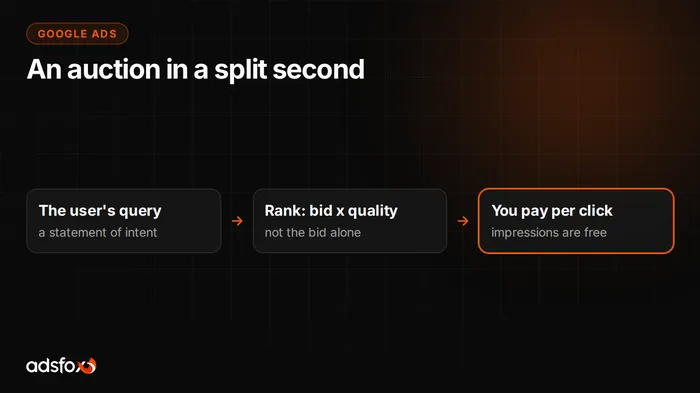
Google Ads works like an auction settled in a fraction of a second: when someone types a query, the system checks which advertisers want to show up for it and orders their ads by bid multiplied by quality. You pay only for the click, not for the impression. That one paragraph is the whole mechanism; the rest of this post explains what it means for your budget.
We are writing this as a foundation piece: without understanding the auction, every conversation about costs and optimization hangs in the air. And surprisingly few people understand it, including companies that have been spending on Google Ads for years.
What happens when someone types a query?
The moment a search is entered, a sequence runs:
- The system checks which advertisers have keywords matching the query.
- It drops ads that do not meet the conditions (for example, quality too low, policy restrictions).
- For the rest it calculates a rank: bid times quality, plus the effect of ad assets.
- It orders the ads by rank and shows the results.
The key word is times. The bid alone does not decide; the product of bid and quality does. That changes everything, because it means you can win in Google Ads with quality, not just with a bigger wallet.
What is Quality Score and why does it lower costs?
Quality Score is a rating of how well your ad and page answer the query. Google looks at three things:
- expected click-through rate: whether people click your ad for this query,
- ad relevance: whether the ad copy matches the search term,
- landing page experience: whether the user gets what they were looking for after the click.
The mechanism is honest in its logic: Google earns on clicks, so it promotes ads people click, and it wants the user to be satisfied after the click, because then they come back to search again. The practical effect for you: a better match means a lower cost per click for the same position. A company with a well-thought-out campaign structure pays less for the same customer than a company with one campaign “for everything.”
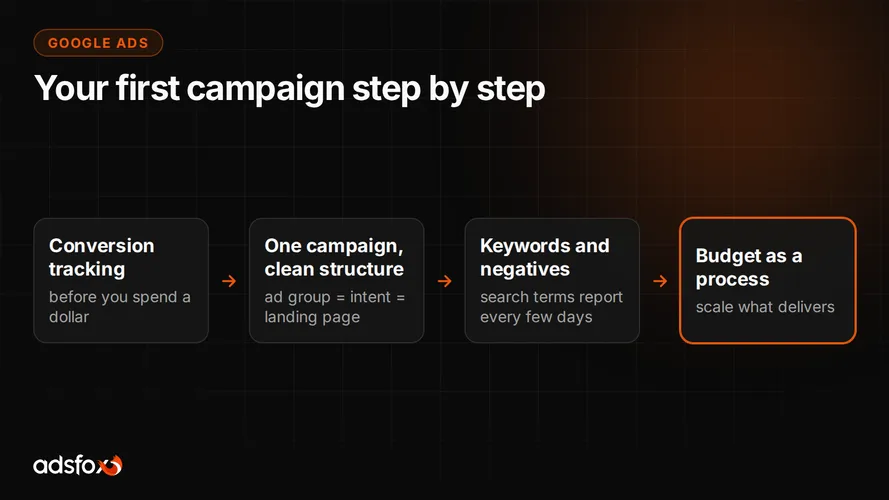
That is why our guide to setting up your first campaign step by step spends so much space on structure: an ad group built around one intent, leading to a matching landing page. It is not pedantry, it is a discount.
What exactly do you pay for?
On Search there is one model: pay per click (PPC). Impressions are free; the cost is charged when the user clicks. The amount comes from the auction: you usually pay just enough to hold your position above the next competitor, not your full maximum bid.
Two things follow from that, and both are worth knowing before your first budget. First, cost per click varies dramatically between keywords and industries, because it comes from the competition in a specific auction. Second, cost per click is not cost per customer: between the click and the purchase sit your website and your offer. That is why we talk about cost per conversion, not per click, and we collected reference points in our benchmark of 20 campaigns across 11 industries: a lead from $2 to $11, depending on the industry. A fuller breakdown of costs is in the post on how much Google Ads costs.
Where does Google Ads work beyond Search?
The system also covers other surfaces: the Display Network (banners on websites), YouTube, Gmail, Maps and Shopping campaigns for online stores. The billing mechanics can differ there (for example, per video view), but the auction and quality principle stays. A newer type is Performance Max, where the platform picks placements across all channels at once within a set spending limit; we cover it separately in what is Performance Max.
For most companies, though, the sensible starting point is Search, because that is where the user declares their intent. The rest gets added once the foundation delivers.
Why doesn’t a campaign “work right away”?
Because the auction is only half of the system. The other half is learning: Google watches which of your ads get clicked, which queries lead to conversions, and calibrates delivery on that basis. To learn it needs data, and data takes time and conversion tracking.
Hence the two most common beginner mistakes: judging a campaign after three days, while the system is still guessing, and having no defined conversions, so the system learns from clicks instead of sales. We steer well clear of both in our process, which you can see on our Google Ads campaigns service page.
What does this mean in practice?
Three takeaways to remember:
- Quality is a discount. Matching the ad and the page to the query lowers your cost per click. Campaign structure is not cosmetic.
- You pay for the click, you earn on the conversion. Track conversions from day one, because without them you are optimizing the wrong number.
- The auction is local. Your costs come from your keywords and your competitors, not from averages found online.
If you want to see how this mechanism plays out on your keywords and what a customer from Google would really cost you, book a free consultation. We will break down the auction for your industry before you spend a dollar.