How to Create a Workspace in adsfox CRM

What Exactly is a Workspace in adsfox?
The workspace in adsfox CRM functions as a folder where data is stored and organized. This is where all created tables are located, in which leads, contacts, and customer information will be saved. Workspaces allow for separating projects and maintaining order, even with a large number of campaigns.
How to Create a New Workspace?
To start working, go to the CRM module in the navigation panel on the left side of the screen. Then click the icon with three dots next to the CRM name to display additional options.
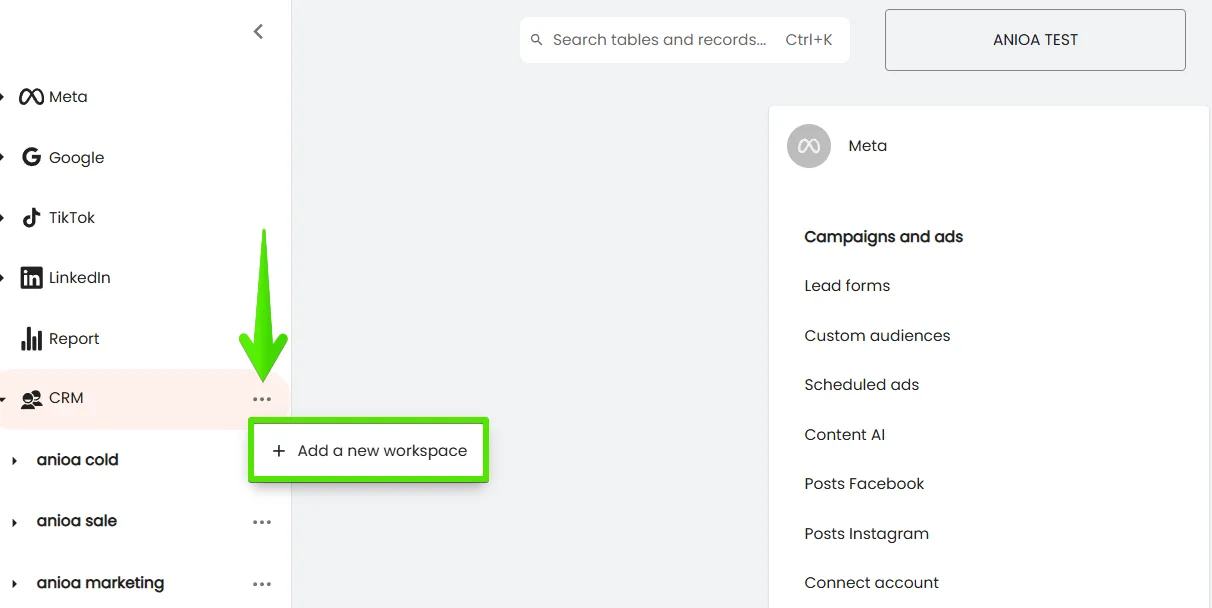
Select the “Add new workspace” option to begin configuring the first workspace.

How to Name Your Workspace?
At this stage, assign a name to the new workspace. You can enter any description, such as “Clients” for collecting sales data, “German Lessons” if the space is for managing course participants, “Summer Camp 1” for organizing events, or simply “Contacts.”
You can edit the workspace name at any time and adjust it to your current needs.
How Many Workspaces Can You Create?
There are no limitations on the number of workspaces, you can create as many as needed. This solution is particularly useful when running multiple projects simultaneously or working with different client groups. This way, each part of your operations has its own organized space.
What Next?
After creating the workspace, the next step is to create and customize tables. These are where detailed information about leads and clients will be stored.
In the next post, we’ll describe how to configure them to make working with CRM even simpler and more intuitive.
How to Create and Customize Tables in adsfox CRM?