New Data and Events from CRM in Meta Ads Campaigns for Enhanced Optimization

New Columns and Data in Ads Manager
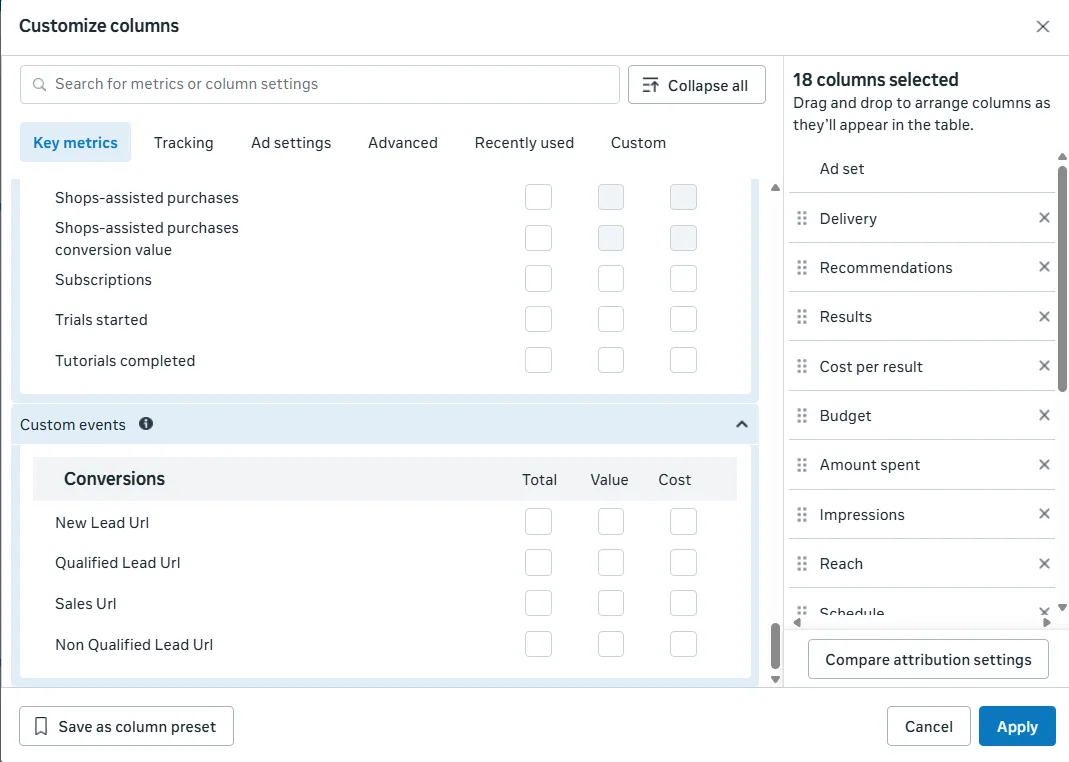
Thanks to CRM integration with Facebook and proper use of UTM parameters, new custom data will appear in your Ads Manager. This enables campaign analysis at a much deeper level – going beyond standard metrics like cost per click or cost per lead.
These CRM events are the signals adsfox lead generation optimization sends to Meta, so campaigns optimize for buyers instead of form fills.
How and where do these data appear?
The new data is a direct result of actions your client takes in their CRM system. When the client tags an acquired contact (e.g., as “qualified,” “unqualified,” or notes a sale), our system automatically sends this feedback to Facebook. Facebook processes these signals and makes them available in your advertising panel as new, custom columns that can be added to the reporting view.
What new information will you see?
You’ll be able to analyze ad effectiveness based on their real business value to the client. Available data will include:
Qualified Leads: This allows you to see which campaigns, ad sets, and specific creatives generate contacts deemed valuable and promising by the client.
Unqualified Leads: This enables identification of ads that attract mismatched or low-quality contacts, allowing you to disable them and optimize your budget.
Value of Qualified Leads: If the client also assigns a specific financial value to leads in the CRM, this information will appear in your panel as well. This enables precise measurement of return on investment (ROAS) for individual advertising actions.
Strategic Benefit: Access to this data allows you to shift from optimizing campaigns for quantity of cheap leads to optimizing for quality and real business results. You can make informed decisions about scaling budgets for ads that bring the client the most valuable leads, while eliminating those that only generate costs.
adsfox is a lead generation optimization tool that helps users integrate their CRM systems with ad platforms like Meta, Google, LinkedIn, and TikTok. It enables companies to track leads, optimize campaigns, and improve sales without increasing their ad budget.
New Conversion Events for Optimization
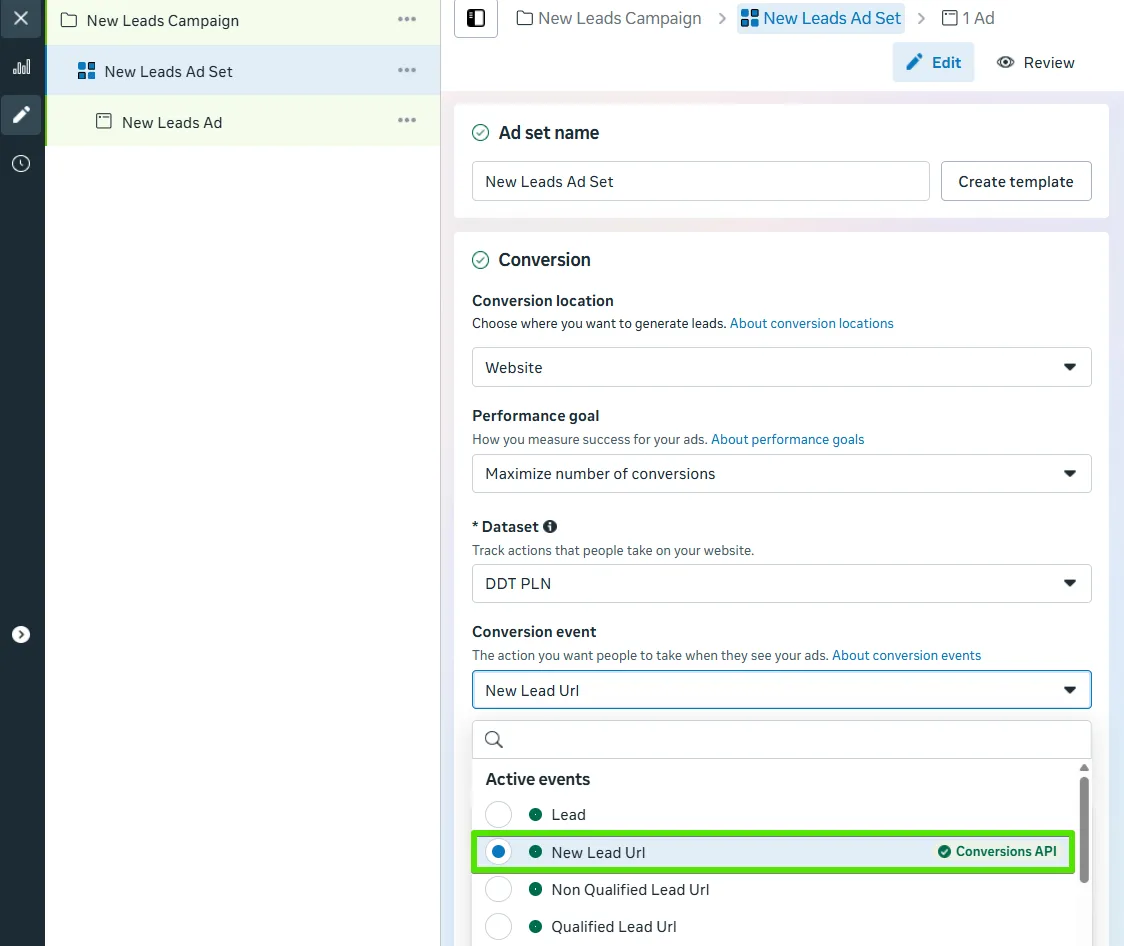
Integrating the CRM system with Facebook creates new, custom conversion events that become available for selection in your campaigns. One of them is New Lead URL, which we recommend using in campaigns directing traffic to your website.
Where does this event come from, and how does it differ from standard tracking?
- Standard Method: Typically, a conversion (lead acquisition) is measured using a script (Facebook Pixel) placed on the thank-you page. This script triggers every time someone loads that page, regardless of whether their data was correctly saved in the system. This leads to frequent discrepancies where Ads Manager shows more leads than the client actually received.
- New Method (via CRM): The New Lead URL event works differently. It is not triggered by a script on the page. Instead, it is sent from our CRM system’s server directly to Facebook’s server (via the Conversion API) and only occurs when the lead actually arrives and is properly registered in the CRM system.
Key Benefits:
Accuracy: This method ensures nearly 100% data consistency between the number of leads reported by Facebook and the actual number of contacts in the client’s database.
Naming: The “URL” suffix in the event name is intentional. It distinguishes events coming from cAPI on the website (URL) from those originating from other sources via our API, such as lead ad campaigns within Facebook (Lead Ads) or manually added leads in the CRM by the client (e.g., from a phone call to the company).
Advanced Optimization for Valuable Leads
After collecting a sufficient amount of accurate data using the New Lead URL event, you can advance to a higher level of optimization.
This process involves “teaching” the Facebook algorithm to search for users similar not to random people leaving contact but to those marked as valuable leads in the CRM system.
How does it work and where do these possibilities come from?
- Mechanism: When the client marks a lead as “qualified” (valuable) in the CRM panel, the system sends a dedicated event to Facebook via Conversion API, e.g., Qualified Lead URL. Thanks to this, Facebook receives a signal that a given user was a valuable contact, and over time, the algorithm learns to recognize common features of users who become valuable leads.
- Effectiveness Condition: For the optimization to be effective, Facebook’s algorithm requires an appropriate amount of data. According to recommendations, you can consider changing the optimization objective when campaigns stably generate at least 5 valuable (qualified) leads daily over the last two weeks.
What options do you have after meeting this condition?
- Optimization for the Qualified Lead URL event: You can directly change the campaign optimization objective from New Lead URL to Qualified Lead URL. Thanks to this, Facebook will aim to acquire contacts that with the greatest probability will be recognized as valuable leads.
Important recommendation at the beginning: We recommend starting campaigns with optimization set to the New Lead URL event. This initial period is key to collecting baseline data and providing Facebook with a sufficient number of signals about what “qualified” leads are. Attempting quality optimization too early, without an appropriate amount of data, will be ineffective.
Summary
Integrating your CRM with Facebook Ads shifts your focus from just counting leads to evaluating their true quality. With precise CAPI events like New Lead URL and Qualified Lead URL, you get spot-on reporting, smarter optimization, and the ability to scale campaigns that deliver high-value contacts.
Once you’ve gathered enough data, switch to optimizing for the Qualified Lead URL event, this ramps up campaign efficiency and boosts your sales results big time.
Next Step: Import Campaigns to the CRM Panel