Facebook Business Verification: Documents You Need
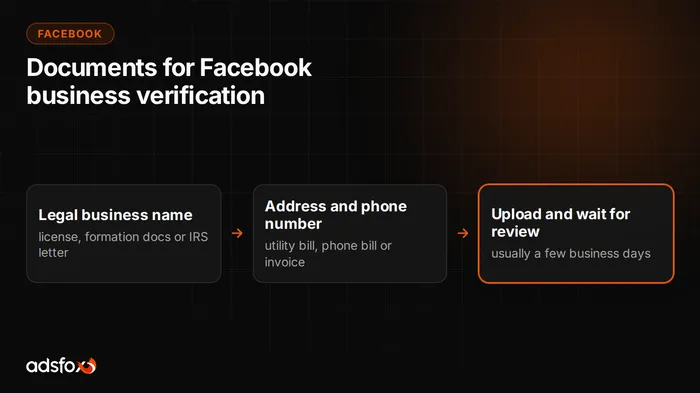
Facebook business verification (Meta Business Verification in Business Manager) can ask you for at least three documents.
You won’t always be asked for all of them, but keep them ready before you start. The process goes much faster when you can upload right away.
If Meta does request documents, verification runs in two steps.
Step 1: proof of your legal business name
In the first step you upload at least one primary document that shows your official, legal business name, spelled exactly as you entered it in Business Manager:
- a business license or permit
- a tax document from the IRS or your state (for example the EIN confirmation letter, CP 575, or a state tax registration certificate)
…plus one supporting document:
- articles of incorporation, certificate of formation or a certificate of good standing from your Secretary of State
Step 2: proof of address and phone number
The second step asks for a document confirming your business address and phone number. The catch: most business documents don’t carry a phone number. A phone bill or utility bill in the company’s name is the easiest fix. If you don’t have one, Meta also accepts a bank statement or an invoice, as long as the phone number is printed on it.
A practical workaround is to use any recent vendor invoice (for example your adsfox invoice, available at https://use.datadriventool.com/settings/billing/invoices). Update your billing details with the vendor so the phone number appears under the tax ID, then download the PDF and upload it for business verification on Facebook.
The billing details on the invoice should be laid out like this:
Legal business name
Street address, suite or unit number
City, state, ZIP code, country
Email address (optional)
EIN or other tax ID
Phone number
If none of your invoices show this information and the vendor can’t reissue one quickly, you can adjust the layout yourself with an online PDF editor such as DocHub.
Business verification is a formality, but without it you can’t unlock certain ad formats or raise your spending limits. Once it’s done, the harder part begins: setting up campaigns so they bring in leads, not just clicks. That is what we do in our Facebook and Instagram ads management.