What Is the Facebook Pixel and Why It Is No Longer Enough
The Facebook pixel is a snippet of code on your website that records what visitors do and sends those events to Meta’s ad system. Those signals are what campaigns learn from when deciding who to look for: the system gets the message “this person bought” and finds people like them. Without the pixel, advertising on Facebook and Instagram is blind. With the pixel alone, in the age of tracking blockers, it is often nearsighted, and that is what this article is also about.
How does the Facebook pixel work?
The mechanics are simple. The pixel code loads with every page and sends two types of events to Meta:
- automatic: the page visit itself,
- defined: actions you mark as important, such as add to cart, form submission, purchase, or a click on the phone number.
The ad system uses these signals for three things: reporting (which ads drove conversions), optimization (finding people similar to those who convert), and retargeting (coming back to people who visited the site). All three rest on the quality of the events. A campaign optimized for “page view” will learn to bring browsers; optimized for “purchase” it will learn to bring buyers. That is why in our guide to your first Facebook ad campaign, the pixel comes before the budget.
How to set up the pixel properly
You can click a plugin in your store and it “sort of works.” A proper setup looks different:
- Create the pixel in Meta Events Manager, inside your company’s Business Manager (not on a personal account).
- Deploy it through Google Tag Manager. GTM gives you one place to manage all your tags and control over when each one fires.
- Define events for the money. Form, phone call, purchase with value. The names of Meta’s standard events matter, because campaign optimization is set up against them.
- Test it. Events Manager shows in real time what is coming in. Check every event before you call the setup done.
A common sin: the pixel is there, but it only tracks visits, because “we’ll do the events later.” Later never comes, and campaigns spend months optimizing for traffic.
Why the pixel alone is no longer enough
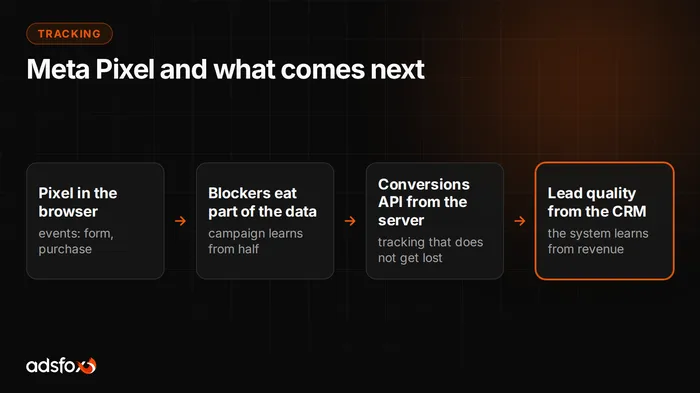
The pixel runs in the browser, and the browser is no longer neutral ground. Ad blockers strip out tracking scripts, mobile operating systems restrict tracking, and some users decline consent. The result: part of the events never reach Meta.
This is not a reporting problem you can ignore. A campaign learns from the signals it receives. If half of the conversions reach it, the system has half the knowledge about who buys from you, and it optimizes worse than it could. You pay for that gap in your cost per acquisition; you just do not see it directly on any chart.
Conversions API: tracking that does not get lost in the browser
The answer is to send events a second way: from the server, through the Conversions API (CAPI). The purchase or form event goes to Meta directly from your website’s back end, bypassing browser blocking. The pixel and CAPI work together, and Meta deduplicates, so nothing is counted twice.
When is it needed? The honest answer: it depends on scale. With a small budget and a simple goal, the pixel is often enough to start. As spend grows, CAPI stops being optional, because the difference in data completeness translates directly into optimization quality. We handle server-side tracking implementations as a separate service, described on our server-side tracking page, and you can find the broader context in our article on tracking without cookies.
Pixel, CAPI, and lead quality: closing the data loop
The top level of this puzzle is closing the loop with your sales system. The form is not the end of the path: a lead can be good or junk, and the ad system does not tell the difference by default. When information about which leads a sales rep qualified flows from the CRM back to Meta, the campaign starts learning from quality, not quantity.
We see what that changes in our own implementations: in one of our medical aesthetics case studies, the share of qualified leads rose from 21.1% to 45.7%. We describe the mechanics of this loop in our article on connecting your CRM to ad campaigns.
Quick Meta tracking checklist
- Pixel created in the company’s Business Manager, deployed through GTM
- Events defined for real money: form, phone call, purchase with value
- Tested in Events Manager: everything is coming in
- As the budget grows: the Conversions API closes the browser gap
- If you sell through leads: a quality signal flows from the CRM back to the campaign
If any of these is weak, your campaigns are working below their potential, no matter how good the creative is. We have been doing these implementations and tracking audits since 2018 for more than 350 clients; see our Facebook and Instagram ads service and book a free consultation. We will check your tracking before you start raising the budget.