Pinterest Catalog Ads: Product Feed and Conversion Tracking
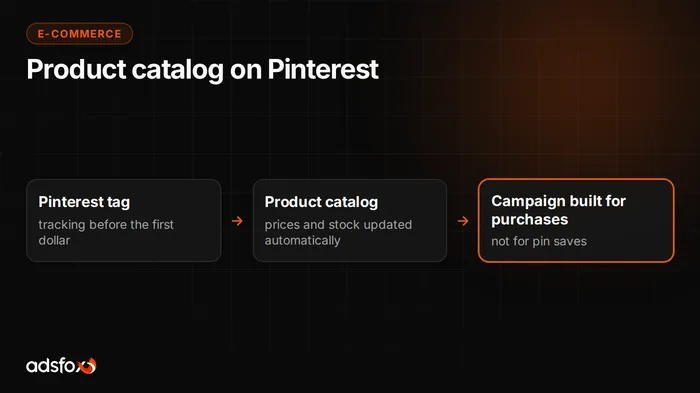
Connecting a store to Pinterest Ads comes down to three elements: claiming your domain, a product catalog uploaded as a data file, and the Pinterest tag with a purchase event. Only then can you run sales campaigns in which products go into ads with price and availability, and the result can be compared with the store’s revenue. The order matters. Without a claimed domain the catalog will not be accepted, and without the tag the campaign has nothing to learn from.
Below is the whole setup path: from the product file, through tag events, to ad formats and attribution windows. Pinterest changes its dashboard and guidelines, so check the current limits in Pinterest Business and Ads Manager before you start.
How to connect a product catalog to Pinterest Ads
A product catalog on Pinterest is a data source that sends the platform the list of products from your store together with price, image, and availability. It is the basis for product Pins, that is, ads showing a specific item instead of a generic brand graphic.
The setup order looks like this:
- Create a Pinterest business account or convert an existing personal account.
- Claim your store’s domain using one of the available methods: a meta tag in the head section, an HTML file on the server, or a TXT record in DNS.
- In the catalogs section, add a data source and point it to the URL of your product file.
- Set a fetch schedule so prices and stock levels stay current.
- Wait for the first processing run and review the error report before you build a campaign.
The first import is often incomplete. Some products drop out because of a missing required field or an image that is too small. The product groups your campaign structure rests on are built only after the catalog is approved.
What does a Pinterest product feed look like?
The product feed is a plain data file in which every row describes one product. Pinterest accepts CSV, TSV, and XML, and the file can be shared through a URL, an FTP server, or uploaded manually.
| Field | Role |
|---|---|
id | unique product identifier, the same as in tag events |
title | product name |
description | description shown with the Pin |
link | URL of the product page in the store |
image_link | main image, vertical performs better |
price | price together with the currency code |
availability | availability, for example in stock or out of stock |
Optional fields are worth filling in right away: sale_price, brand, product_type, google_product_category, item_group_id for variants, and additional_image_link.
If the store already runs Shopping campaigns in Google, the Merchant Center feed usually works as a starting point. Check field names, the price format with currency, and availability values, though, because that is where most rejections happen.
How to install the Pinterest tag and which events to send
The Pinterest tag is a piece of code that sends the platform information about user behavior on your store’s website. It consists of a base code, fired on every page, and event codes added at specific points along the purchase path.
| Event | When it fires |
|---|---|
PageVisit | visit to any page |
ViewCategory | viewing a product list in a category |
Search | using the store’s search |
AddToCart | adding a product to the cart |
Checkout | completed purchase |
Signup | account registration |
Lead | submitting a contact form |
The Checkout event must pass the order value, currency, and IDs of the products bought. Without those parameters you will see the number of transactions in the report, but you will not be able to calculate return on ad spend.
One thing decides whether retargeting works: product IDs in events must match the id field in the catalog. A mismatch between the store system and the product file means the campaign cannot find abandoned carts. The most convenient way to implement it is through Google Tag Manager, then verify it with the Pinterest Tag Helper extension.
Is the browser tag enough for conversion tracking?
Not in every store. Code running in the browser loses a share of events because of script blocking, privacy settings on phones, and shorter cookie lifetimes. The larger the share of mobile traffic, the bigger the gap between the number of orders in the store and the number of conversions in the ad dashboard.
Pinterest provides a Conversions API, a channel for sending events directly from the server. The purchase event then leaves the store system, not the customer’s browser, so it does not depend on what the device blocks. There is one condition: every event must share an ID with its browser counterpart, otherwise the same transaction gets counted twice.
The mechanism is similar on every ad platform, and we describe it in more detail in our server-side tracking service. Remember consent, too: you send data only when the user has agreed in the cookie banner, in line with GDPR (EU) and US state privacy laws such as CCPA.
Which ad formats work for an online store on Pinterest?
The ad format determines how the creative looks in search results and on users’ boards. For a store the foundation is catalog-based ads, because the inventory goes into them with the current price.
| Format | Use in e-commerce |
|---|---|
| Product Pin from the catalog | a single item with price and availability, the base of sales campaigns |
| Static Pin | a manual creative for a promotion, seasonal collection, or category |
| Video Pin | showing the product in use, an unboxing, a before-and-after |
| Carousel | a set of several products in one ad, 2 to 5 images |
| Collection | a large hero creative plus catalog products below it |
A vertical 2:3 ratio is a safe starting point for images, and current resolution requirements are best checked in the ad dashboard because they change. Title and description have their own character limits, worth checking in the dashboard before you write the copy, but the first sentence is what decides anyway.
The photo matters more than the text here. A product shown in context, a lamp in a room or shoes on feet, performs better than a cut-out pack shot on a white background.
How to set up conversion tracking and attribution windows
Start by choosing a sales-oriented campaign objective and picking the event that is to count as a conversion. For a store that is Checkout, not a Pin save or a click to enlarge a photo. You set the spending limit yourself at the campaign or ad group level, and the platform decides who sees the ad and where, within that limit.
A separate decision concerns attribution windows. By default Pinterest counts conversions after a click, after engagement, and after a view alone, over a longer horizon than most channels. Check the setting in the dashboard before the first report, because it determines how many transactions you will see.
The numbers in Pinterest Ads and in Google Analytics 4 will not be identical. GA4 looks at the last source of the visit, Pinterest at contact with the ad. Treat the dashboard as an optimization tool and base budget decisions on orders from your store system.
When does Pinterest Ads not make sense?
There are situations in which it is better to skip this channel, and it is better to say so before the first dollar is spent:
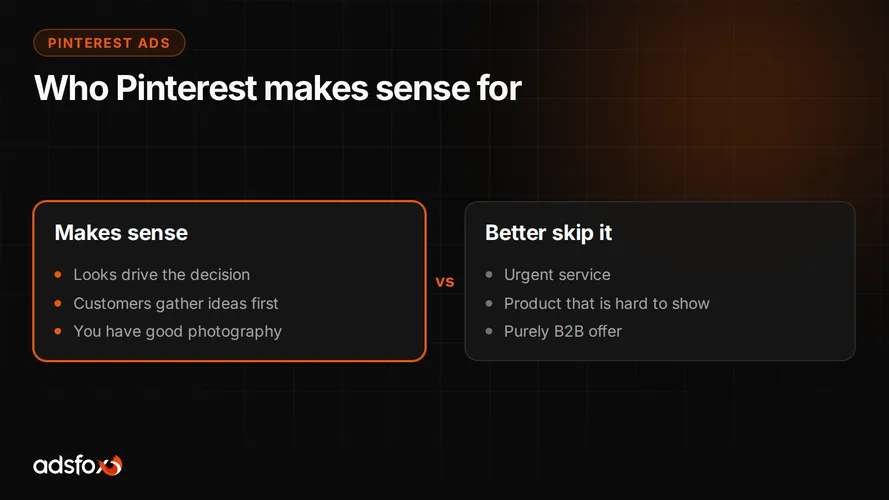
- The store has no good product photography and is not planning a photo shoot.
- The product is hard to show in an image, or its looks do not influence the purchase decision.
- The offer serves an urgent need, where the customer buys right after searching.
- The budget covers one channel, and campaigns in Google or on Facebook and Instagram still grow when you raise spend.
- The company needs results within two weeks, while Pinterest settles in a longer decision window.
We have not yet run Pinterest campaigns at a scale that would let us quote our own customer acquisition cost on this channel, so you will not find that number here. Reference points from Meta Ads and Google Ads campaigns are collected in our CPL and ROAS summary. Treat them as background for a budget conversation, not a forecast of Pinterest results.
Pre-launch checklist
A short review that catches most problems before the start:
- The store domain is claimed on the business account.
- The catalog processed without errors, and the number of accepted products matches the inventory.
- Prices and availability update at least once a day.
- The tag base code fires on every page.
- The purchase event passes value, currency, and product IDs.
- IDs in events match the
idfield in the catalog. - Events fire only after the user consents in the cookie banner.
- The attribution window in the dashboard is set deliberately, not left by accident.
- Images are vertical and show the product in use, not only on a white background.
Point six is often skipped and usually surfaces only during retargeting, when the campaign cannot find abandoned carts.
Where to start the setup
Start with the catalog and the tag, because without them a sales campaign has nothing to work with. Manual creatives and format tests make sense only once product data and measurement are in place. The reverse order ends with a budget spent on traffic that cannot be accounted for.
adsfox has been doing this since 2018, and we have served more than 350 clients in more than 20 industries. We are a Meta Business Partner (Badged) and a Google Partner. With a new channel we first check whether the store has what it takes to feed it: photos, a product file, correct measurement. If you are considering Pinterest advertising, we will go through your inventory together and assess whether this channel fits your offer.
Get a free consultation: we will check your product catalog and conversion tracking and prepare a plan for launching campaigns on Pinterest.