
Typeform Conversion Tracking That Goes Beyond the Thank-You Page
Typeform conversion tracking usually stops at a thank-you page or a pixel firing inside an iframe, which is exactly where Google Ads cookies and UTM parameters get lost. adsfox connects to Typeform through a webhook, captures every submission with the campaign and click identifiers from the page it was embedded on, and sends the conversion server-side to Google Ads, Meta, TikTok, LinkedIn and GA4.When sales marks the lead as qualified or won in the CRM, that outcome goes back to the same platforms.


Join 350+
happy clients.
Why thank-you-page tracking fails with Typeform
An embedded Typeform lives in an iframe.
Cookies set on your website, including the Google Ads Conversion Linker cookie and the Meta _fbp cookie, are not shared with the form, and UTMs are not carried into it.
Typeform shows up as the traffic source in GA4, Google Ads cannot match the conversion to the click, and the ad platform learns nothing.
adsfox reads the identifiers on your page and stores them with the lead.
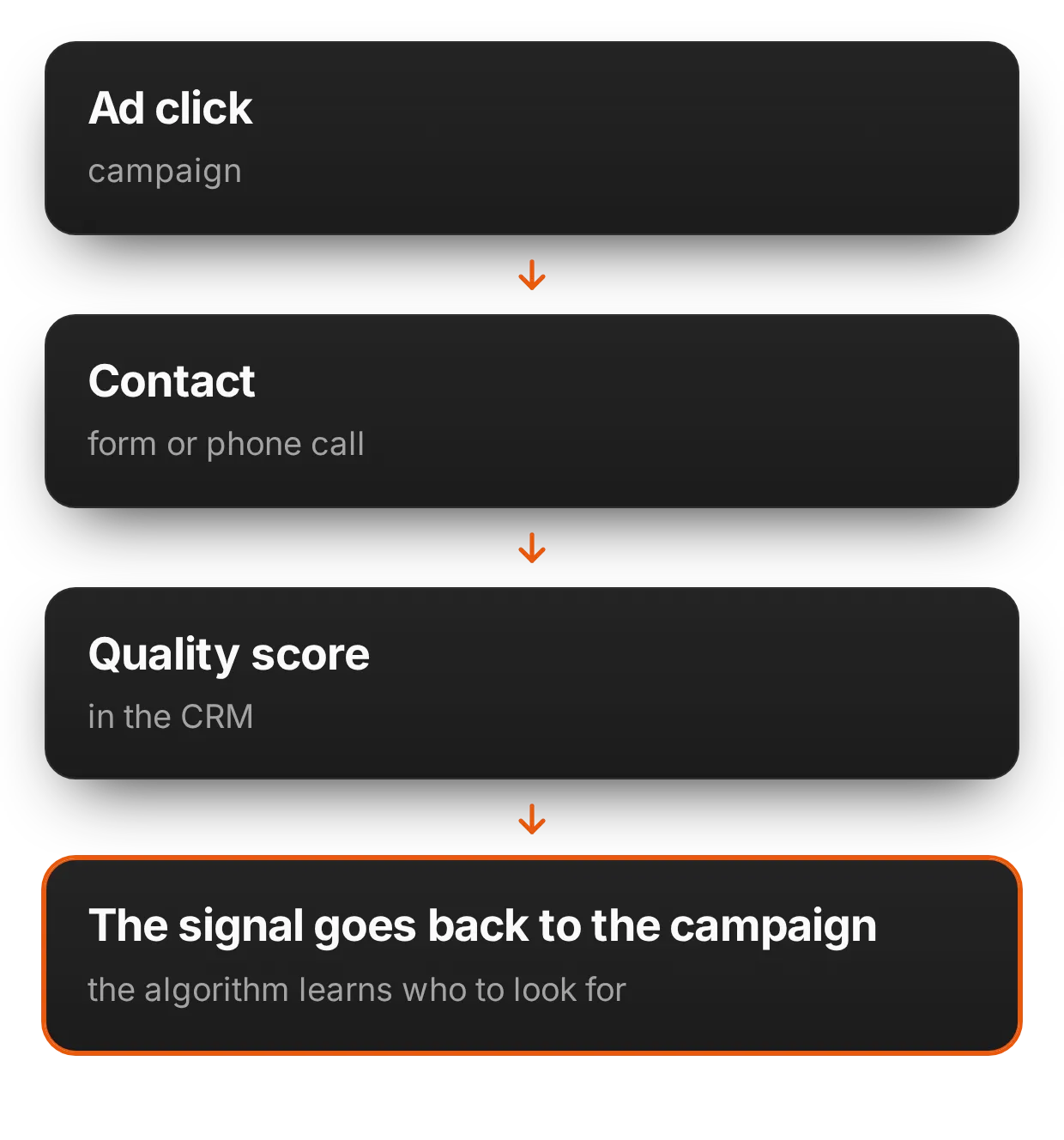
Connect Typeform once, send every submission everywhere
Sign in with Typeform inside adsfox, pick the form, and adsfox adds a webhook to it.
Every new response arrives within seconds and goes out as a conversion to Google Ads (offline conversions API), Meta, TikTok and LinkedIn (Conversions APIs) and GA4 (Measurement Protocol).
One setup, each conversion counted once per platform thanks to event IDs, no GTM listeners and no tag per platform.

The real lead source behind every Typeform lead
Every submission carries its source, campaign, ad, landing page and UTMs, plus the GCLID, FBCLID, TTCLID and GA4 client ID captured on the first visit.
You see which Google Ads keywords, Meta ad sets and Instagram ads bring Typeform leads, and later which of those leads became customers.

From form submission to CRM outcome
adsfox follows the lead through the stages your team already uses in HubSpot, Salesforce, Pipedrive, Zoho CRM or the built-in adsfox CRM: new, qualified, non-qualified, won with value, lost.
Each stage change becomes an event sent to the ad platforms with the identifiers stored at submission time, so Google Ads and Meta optimize for people who buy, not for whoever fills out the form.
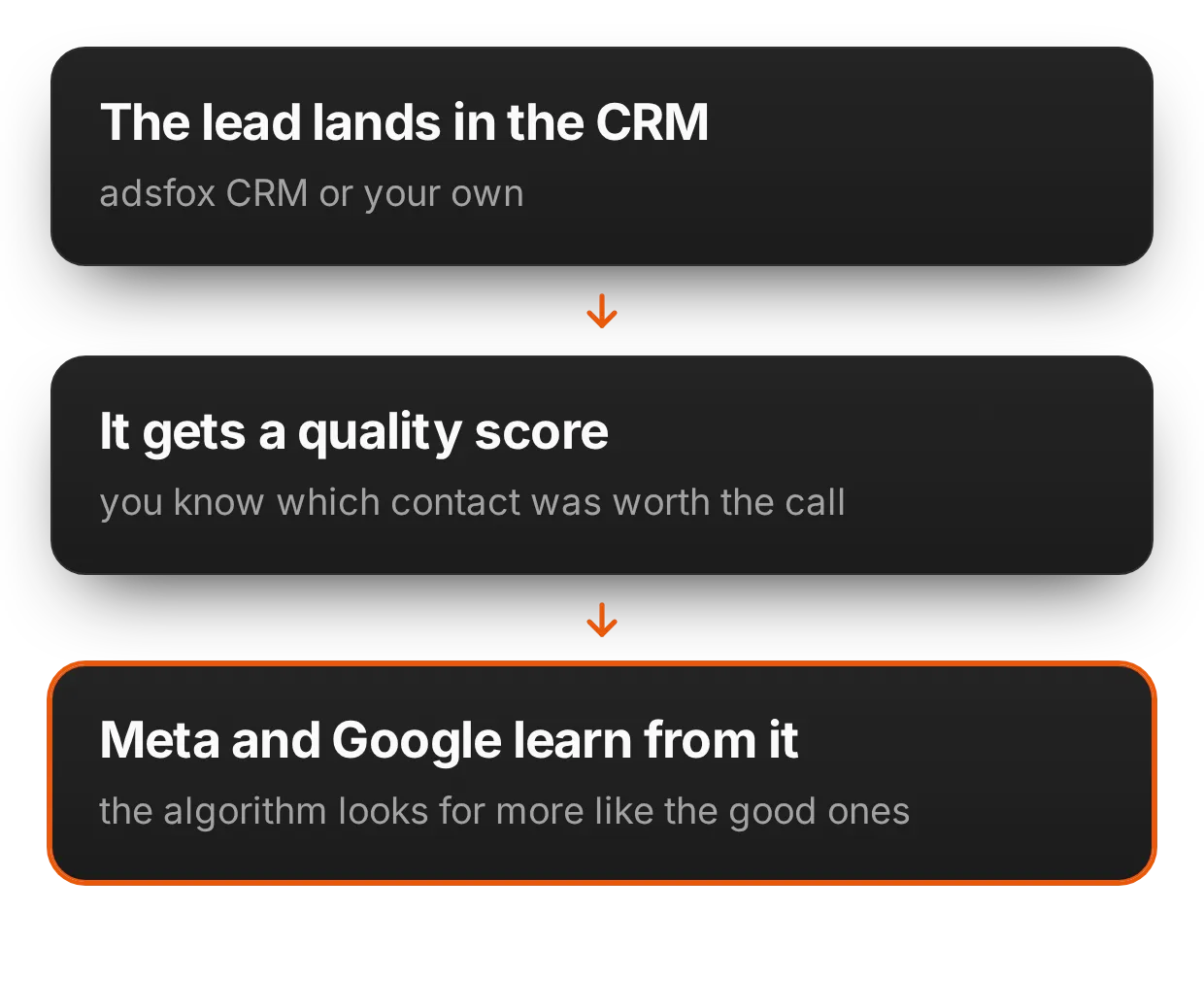
Typeform Google Analytics integration done right
Typeform's native GA4 event tells you a form was submitted.
adsfox sends the submission and every later stage (qualified lead, sale with value) to GA4 with the client ID from the original session, so events land on the user who clicked the ad, not on a new user created inside the iframe.
Build a funnel from landing page to closed deal and stop seeing typeform.com as a referral.
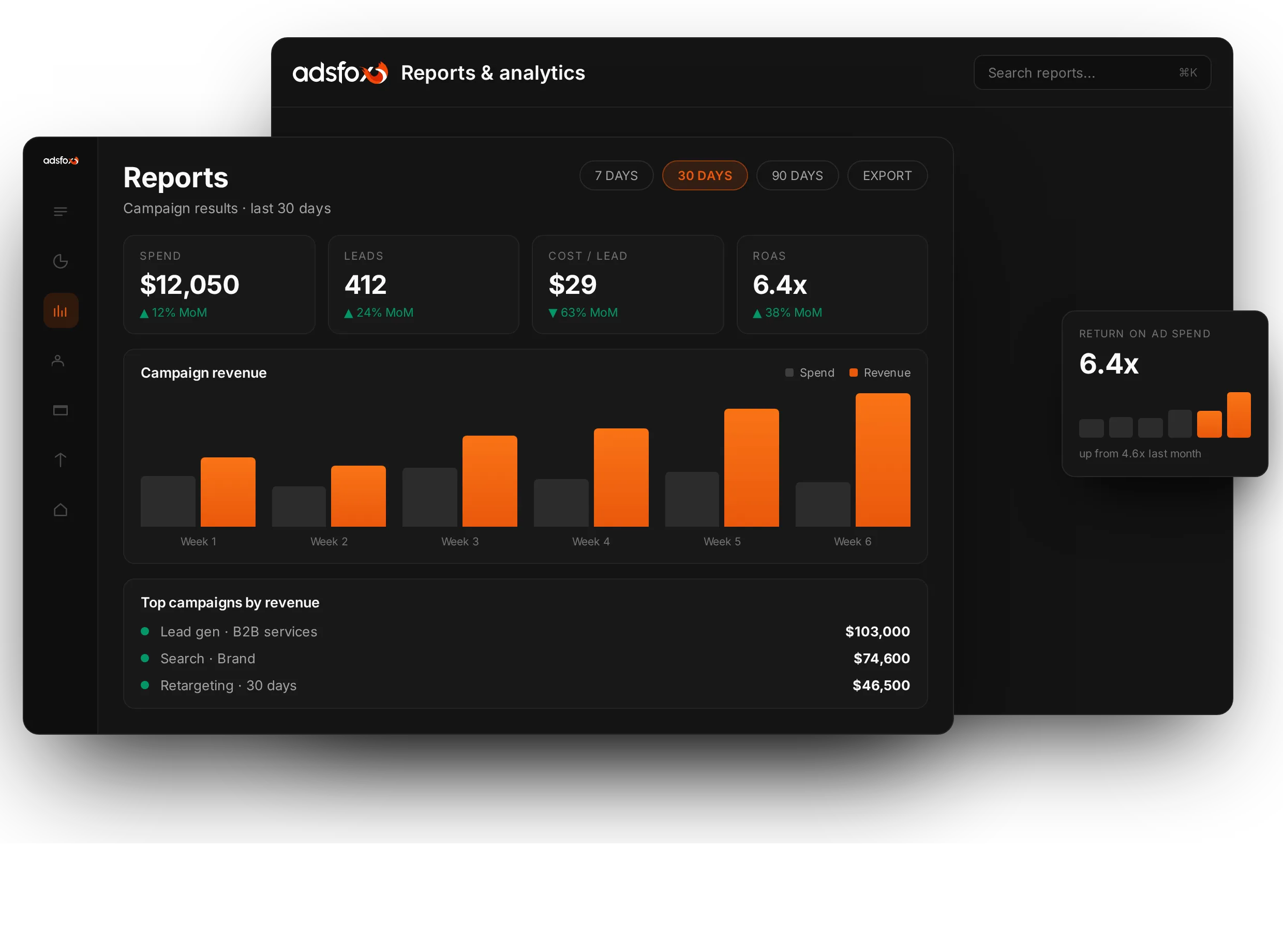
More qualified leads from the same Typeform
Our clients get 17.6 to 40.4 percent more sales-qualified leads when they tag leads within 3 days, optimize campaigns for qualified leads and exclude unqualified leads from targeting.
Meta reports a 19 percent lower cost per high-quality lead when advertisers connect their CRM and switch the objective from lead volume to conversion leads.
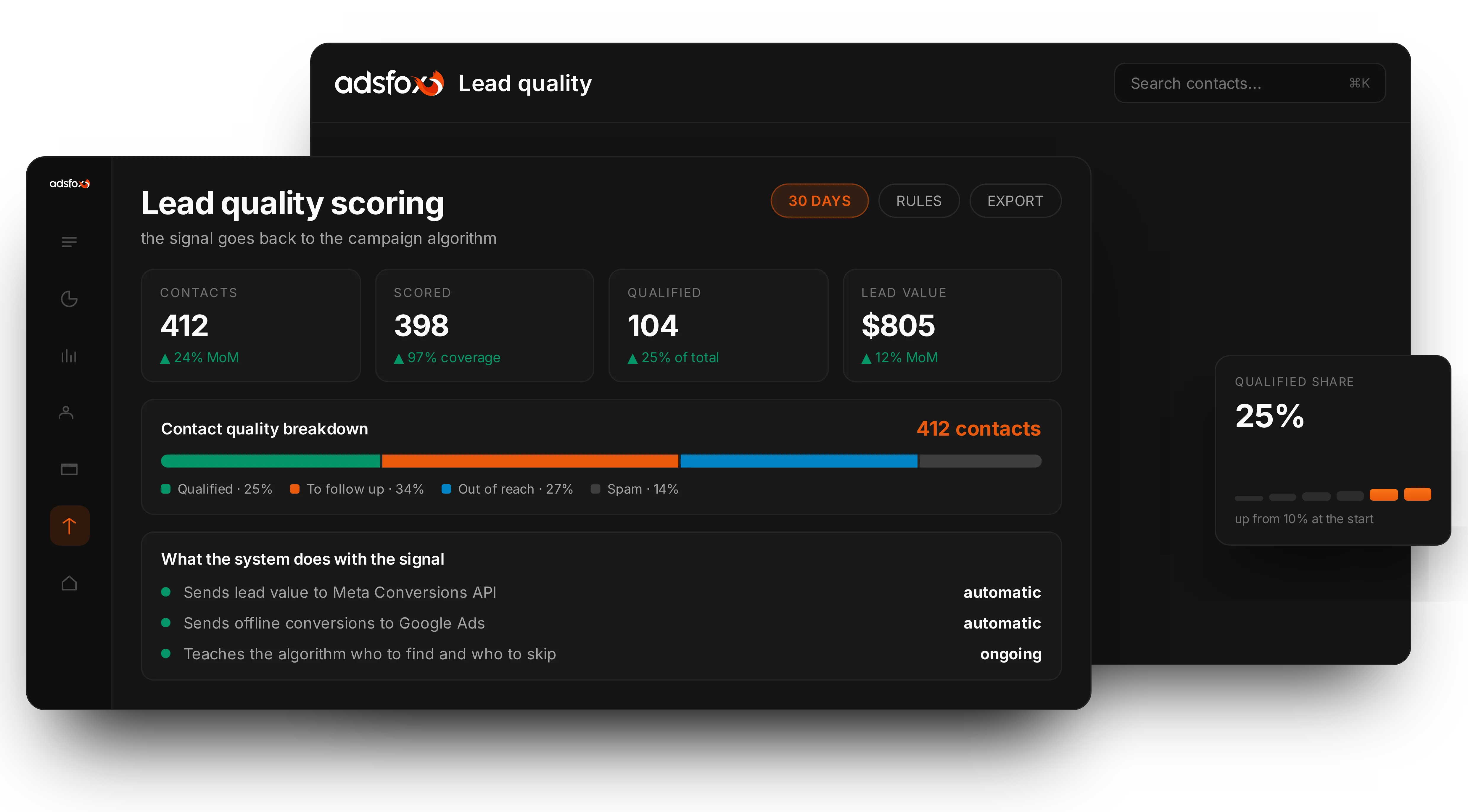
How Typeform conversion tracking works in adsfox
- Connect your Typeform account in the adsfox Integrations tab and choose the forms used for lead generation.
- Add the webhook. adsfox registers it on the form; every response, including hidden fields, is delivered as soon as it is submitted.
- Pass the tracking data. adsfox adds a
typeformpayloadhidden field and updates your embed code, so click IDs, GA4 client ID, UTMs and landing page travel with the response. This is the step thank-you-page tracking cannot do. - Connect ad platforms and your CRM. The submission goes out as a conversion; the lead lands in the CRM with its source; stage changes come back as outcomes.
Screenshots and details: how to set up Typeform in adsfox. The website snippet works the same on WordPress, Webflow, Wix, Squarespace, Unbounce, Leadpages, Instapage, ClickFunnels, GoHighLevel and Kartra.
Typeform Google Ads conversion tracking
Typeform's built-in Google Ads option and most GTM setups depend on a cookie the iframe cannot read, so conversions are missing or unattributed. adsfox stores the GCLID from auto-tagging on your page, attaches it to the submission and uploads the conversion through the Google Ads offline conversions API with the conversion action, time and value. When the GCLID is missing, enhanced conversions for leads match on the hashed email or phone from the form. Qualified lead and sale events from the CRM follow the same route, so Smart Bidding can work toward conversion value. Guide: connect adsfox with Google Ads.
Typeform Facebook conversions integration (Meta Conversions API)
For Facebook and Instagram ads, every submission goes to the Meta Conversions API with email, phone, FBCLID, the _fbp cookie, IP address and user agent, far more matching keys than a pixel inside an iframe, with an event ID for deduplication. Once CRM outcomes flow in, you can run the conversion leads optimization goal, build lookalikes from buyers and exclude non-qualified leads. Guides: Meta Ads, pixel for CRM events, TikTok Ads, LinkedIn Ads.
Typeform Google Analytics integration (GA4)
adsfox sends the submission to GA4 through the Measurement Protocol with the client ID captured on your page, then each CRM stage with the lead value as the event value. Mark the submission as a key event and build funnels from first click to closed deal, with source and medium correct even when the form is embedded or opened from a Typeform link. Guide: integrate adsfox with Google Analytics 4.
Typeform HubSpot, Salesforce, Zoho CRM and Pipedrive integration
Native connectors and Zapier send Typeform responses to a CRM, but they do not bring the sales outcome back to the ad platform that generated the click. adsfox sits in the middle: the lead is created with its source and identifiers, pushed to HubSpot, Salesforce, Pipedrive, Zoho CRM, Livespace, Bitrix24, Microsoft Dynamics 365 or any webhook-enabled system, and when the stage changes there, adsfox turns it into a conversion for every platform. Teams without a CRM use the built-in adsfox CRM with lead tagging. See the general procedure for connecting CRMs, the Pipedrive and Zoho CRM guides, or the CRM Conversions API page.
Typeform, Calendly and every other lead source in one funnel
A Typeform qualifies the visitor, a Calendly link books the call, a phone number catches the rest. adsfox treats each as a lead source with the same identifiers, so a lead that submits a Typeform and then books a meeting is one contact with one journey, not two conversions. See Calendly conversion tracking, offline conversion tracking for calls and signed contracts, and lead generation tracking for the overview of sources and outcomes. adsfox runs alongside your existing GTM and server-side tracking; nothing has to be torn down.
Pricing and next steps
Typeform conversion tracking is included in every adsfox plan. Essential starts at $239 per month billed annually ($294 monthly) with two ad platforms, GA4 and three integrations (pricing). Agencies manage several clients from one account (adsfox for agencies). The whole system is described on the lead generation optimization page. Book a demo or estimate the gains with the lead quality ROI calculator.
What our clients say
What I value most about working with you is having a dedicated specialist. The person matters, what they can do and how they communicate, and that is what I appreciate at adsfox. With other agencies and freelancers I could never get satisfying results. Now, after two years of working with you, it simply works.

Piotr
Owner, outdoor LED lighting manufacturer (luminous paving stones)
Given my own marketing background, I would definitely recommend working with adsfox. Highly recommended. These guys know what they are doing. I think adsfox is a great partner to work with.

Przemysław
Marketing director, event services company (crew and technical staffing)
What I value most about adsfox is that it is not a "pay and wait" arrangement. At any moment I can see where the money goes and what return it brings, and I have direct contact with specialists who advise me not only on ads but also on my offer and strategy. I delegate the complicated stuff and still keep full control over the outcome.

Dawid
Owner, e-commerce store (personalized wooden gifts)
Our revenue grew significantly and we won a lot of new clients, which is not easy in our business. That month was a record in terms of revenue, and a lot of women decided to book our services. Our schedule was packed, so we actually had to pause the ads for a while.

Justyna
Owner, women's body shaping and fitness studio
I am very happy with the cooperation. Many more customers started calling. We also see much higher traffic in our stats, both from Facebook and from Google, and it turns into phone calls and new bookings. I am very pleased with working with you.

Marcin
Owner, paintball park and outdoor events venue
With you I now pay almost 10 times less per conversion and get 200 new subscriptions a month, so for me this is a game changer.

Łukasz
Marketing manager, online courses and consulting (personal development)
Typeform conversion tracking FAQ
With adsfox: connect Typeform, connect Google Ads, and every submission is uploaded through the offline conversions API with the GCLID captured on your page and a hashed email or phone as a backup match key. A manual GTM setup (conversion ID and label, trigger on the submit message) cannot read the Google Ads cookie inside the iframe, so matching is weak.
An embedded Typeform runs in an iframe and cannot share the Google Ads Conversion Linker cookie or the GCLID with your website. The conversion may fire, but Google cannot attribute it to the click. adsfox captures the identifiers on the parent page, passes them into the form through the typeformpayload hidden field and sends the conversion server-side.
Typeform does not inherit UTMs from the page, and hidden fields filled from the URL work only when the visitor lands directly on a page with the parameters. adsfox stores UTMs, landing page and click IDs from the first visit and writes them into the submission when it is sent, so the source survives multiple visits.
Yes. Each submission is sent to GA4 through the Measurement Protocol with the client ID from the original session, and each later CRM stage (qualified lead, sale with value) to the same user. Setup: GA4 integration guide.
Yes. adsfox receives the response, creates the lead with its traffic source and pushes it to your CRM. When the stage changes there, adsfox sends the outcome (qualified, non-qualified, sale with value, lost) to Google Ads, Meta, TikTok, LinkedIn and GA4. Any CRM with webhooks or an API works; the built-in adsfox CRM is included.
Yes. The adsfox snippet goes on the page with the embed (guides cover WordPress, Webflow, Wix, Squarespace, Unbounce, Leadpages, Instapage, ClickFunnels, GoHighLevel, Kartra and systeme.io) and the embed code is updated once. Standard, popup and full-page embeds are supported; Typeform links in emails or ads are tracked from their UTMs.
A recorded submission is not a qualified lead or a won deal, and attribution breaks when UTMs and click IDs are not stored with the lead. adsfox keeps one identity per lead from first click to CRM stage and counts each event once per platform with event IDs, so Google Ads, Meta, GA4 and your CRM describe the same people.