Website Templates: When They Are Worth Using
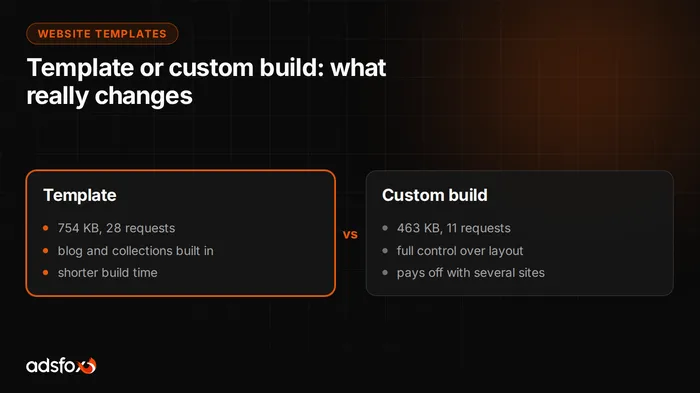
A website template is a ready set of layouts, components and styles that shortens a website build by dozens of hours and, against intuition, costs almost no speed. We checked that with a measurement: the average of five of our sites on an Astro template is 754 KB, and a site built from scratch is 463 KB. The difference is less than three tenths of a second of transfer, and in return the template gives you a ready blog, content collections and image optimization. Below we break down when a template is enough, when it is better to build from scratch, and which tools, libraries and MCP servers we use for both.
Is a website template enough for a business?
For most service business projects, yes. The reason is arithmetic.
When building from scratch, you pay to recreate things that look similar on every business site: the page grid, the header, the footer, blog support, cards on the post list, a form, image handling in several resolutions. That is work measured in dozens of hours, and nobody will see it as a differentiator, because the customer judges the content and whether the site answers their question.
The argument usually made against templates is: it will be slower because it includes things I do not need. We measured that on our own builds, and the difference is less than three tenths of a second. The full table of the seven-site measurement, with the method, is in our post on how to build a business website.
The practical conclusion: building from scratch wins you control and the number of server requests, not speed. The money saved on a template is better spent on content, because content decides whether the site ranks for queries and gets cited in an AI model’s answer.
When is a template not enough?
There are four situations where we advise against a template:
- An unusual layout the template cannot handle. Not colors and fonts, because those change in every template, but structure: for example, a catalog with filtering or a site with many levels of nesting.
- The site turns into an application. A pricing calculator, a configurator, a client portal. That needs logic, not layout, and a template shortens nothing.
- You plan several sites. With several brands or locations, it pays to build your own component base once and use it everywhere. Then the first project is more expensive, and every next one is clearly cheaper.
- The template is built on a heavy stack. Not every template is light. Before you buy, open the demo page and check how much it weighs and how fast it shows content.
Where to look for website templates
Free templates built with Astro are collected at htmlrev.com. It is a good place to start if you want to see what a static site looks like from the inside and compare a few layouts.
Paid templates are bought from author catalogs, where you usually get blog support, content collections and image optimization in the package right away. Our template-based builds, adapted to the client’s brand, can be viewed here: Halogen, Klinika Aleja, Dobry Fach and Trawers (demo sites in Polish).
When choosing a template, we check three things, in this order:
- Does it serve ready HTML. If the content appears only after JavaScript runs, search engines and AI models see an empty page.
- How much does the demo page weigh. Open it and check how long it takes before you see text, not a loading animation.
- Does it have a blog and content collections. Adding them later costs more than choosing a template that has them from the start.
Which tools we use to build websites
Below is the state as of August 9, 2026: the full list of what we have actually tested when building sites for ourselves and for clients. Some of these tools are widely recommended in video content and on Instagram, so we note next to them what they actually cost in page weight.
The foundation the site stands on
| Tool | Role | Where to find it |
|---|---|---|
| Astro | Pages generated as ready HTML. Content visible to search engines and AI models without running JavaScript | astro.build |
| Tailwind 4 | Styling written as classes in the markup, one stylesheet per site | tailwindcss.com |
| GSAP | Animation engine: page entrance, counters, element movement | gsap.com |
| ScrollTrigger | GSAP plugin, scroll-driven animations | included with GSAP |
| Lenis | Smooths scrolling, wired to ScrollTrigger, disabled on touch screens | github.com/darkroomengineering/lenis |
| Playwright | Screenshots, page-weight measurements, prerendering the static variant | playwright.dev |
A note from implementation: we load GSAP dynamically, so it goes into a separate file and does not block the page start. The full version with all plugins is free.
The interactive layer, added selectively
| Tool | Role | Where to find it |
|---|---|---|
| React islands | Embedding a React component in a static page, only where interactivity is needed | docs.astro.build |
| View Transitions | Smooth transitions between pages without a reload | built into Astro |
| shadcn/ui | Registry of interface components | ui.shadcn.com |
| daisyUI | Ready components as pure CSS classes on Tailwind | daisyui.com |
| Flowbite | Tailwind components with minimal JavaScript, more patterns than daisyUI | flowbite.com |
| frontend-design skill | Design instructions for an AI agent: no template defaults, a requirement for distinctive visual decisions | github.com/anthropics/skills |
Animation and graphics, where speed is easiest to lose
| Tool | What it is | Cost in weight |
|---|---|---|
| Motion | Lightweight animation library on the browser’s native API, simpler syntax than GSAP | low |
| Rive | Interactive vector animations, for example a logo that reacts to the cursor | tens of KB, the lightest way to “living” elements |
| Lottie | Player for animations exported from After Effects as JSON | medium, the standard when a designer animates |
| Spline | No-code 3D editor, the object embeds with a single tag | its own runtime, hundreds of KB |
| Three.js | Full 3D engine in the browser | the heaviest tool on the list |
The rule we follow: the higher in this table, the more readily we use it. Three.js and Spline make sense for a product showcase, where the visitor came to look. On a service business site, where someone is looking for contact details on their phone on the go, their cost rarely pays off.
Catalogs of ready components
Three catalogs from the same family, from which you copy ready effects: spotlights, beams, text animations, 3D cards, backgrounds.
| Catalog | What sets it apart | Where to find it |
|---|---|---|
| Aceternity UI | Flashy React components to copy, strongly visual | ui.aceternity.com |
| Magic UI | Over 150 React and Tailwind components for fast prototypes | magicui.design |
| React Bits | Specialized in text and background animations: aurora, typewriter, grids | reactbits.dev |
Each of them is a React island, so the same rule applies as above: add selectively and check how much the effect weighs.
What is MCP and which ones do we use for websites?
MCP is an open standard for connecting AI models such as Claude or GPT with external data sources, files and developer tools. It works like a universal plug: instead of copying code from component catalogs, the model reaches for them itself while working on the site.
| MCP | Role | Where to find it |
|---|---|---|
| 21st.dev Magic MCP | Search across over 10,000 ready React components straight from the conversation. Free plan: unlimited search, two code downloads a day | 21st.dev/mcp |
| shadcn MCP | shadcn/ui component registry available from the conversation | ui.shadcn.com/docs/mcp |
| v0 MCP (Vercel) | Generating whole interface sections from a text description | v0.dev |
| Higgsfield MCP | Image and video generator wired into the conversation. For us: product renders. Requires an account | higgsfield.ai/mcp |
The most interesting use, though, lies outside building the site itself. Google Search Console connected via MCP to the site’s data lets you check how content changes translate into the real queries people use to reach the site. Expanding copy stops being guesswork, because you work on what users actually type into the search engine. It is the same work we do in SEO, only done faster.
What ties it all together
For working on a site yourself, a code editor is enough, for example Visual Studio Code or Cursor, with the MCP servers from the table above connected.
In our process, an AI agent analyzes keywords, proposes the section layout and prepares first drafts of copy, and a specialist decides what goes on the site. We publish nothing without a human review, because a business website is no place for content nobody has read.
adsfox is a marketing agency for service businesses that runs the whole of marketing: content, SEO and AI search optimization, ad campaigns and the website. Over 350 clients since 2018, Badged Meta Business Partner and Google Partner.
What this means for your business
If you are thinking about a new website, the order of decisions is:
- Start with a template, unless you hit one of the four exceptions described above.
- Check the weight of the demo page before you pay for a template or approve a design.
- Move the budget you save to content, because content decides visibility in Google and in AI answers.
- Add animations last, and only where they explain something, not everywhere they can go.
Want to see what this looks like in practice? We describe our web design agency service, and if you have a specific project in mind, get in touch and we will tell you plainly whether a template is enough in your case.